NEW Next-Gen Desktop Aesthetics for Windows 10 & 11

Bring Authentic Charm & Physics to Your Windows Desktop.

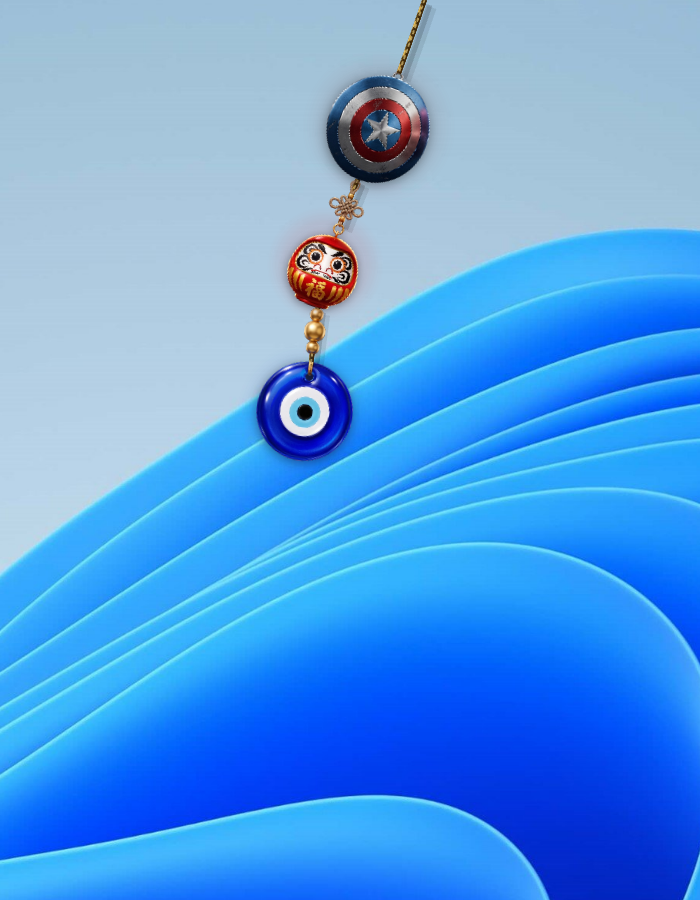
Hangly attaches ultra-realistic, physics-simulated hanging charms, spiritual tokens, and pop-culture icons directly to your screen bezel, active windows, or taskbar with real swinging dynamics.

Windows 10 / 11 (64-bit) 130 MB Standalone Installer Instant Paytm UPI Unlock (β‚Ή51 / β‚Ή101)
βœ“ Verlet 2D Rope Physics
βœ“ <0.5% CPU When Idle
βœ“ Multi-Monitor Ready
Interactive Verlet Simulator (Live Engine)
πŸ‘† Click & drag to swing or flick the charm!

Everything You Need for a Hypnotic Desktop

Built from the ground up with hardware-accelerated WPF, native C# Verlet dynamics, and zero bloat.

🎯

Authentic Verlet Physics

Multi-segment rope constraints simulate accurate mass, inertia, drag friction, and centrifugal momentum when you flick or nudge it.

⚑

Zero Resource Overhead

Intelligent sleep engine suspends physics when charms settle or during full-screen games, consuming under 0.5% idle CPU and <45MB RAM.

πŸͺ…

Multi-Charm Stacking

Hang 1, 5, or 10 charms simultaneously. Pin them to different monitors, anchor them to different windows, or cluster them as aesthetic mobiles.

🎨

Custom Charm Creator

Easily import your own PNG, SVG, or animated GIF files. Turn your pet, favorite anime waifu, gaming logo, or brand into a desktop charm.

πŸ–₯️

Multi-Monitor & DPI Aware

Full support for 1080p, 1440p, 4K, and Ultrawide setups with per-monitor DPI scaling. Charms remain razor-sharp and fluid on every display.

πŸ’Ž

70+ Handcrafted Charms

Includes Japanese lucky cats, Turkish Nazar protection amulets, Marvel & DC heroes, Breaking Bad memorabilia, and sacred Tamil heritage deities.

See Hangly in Action on Desktop

Real screenshots running on real Windows 11 machines with dynamic wallpapers and multi-window setups.
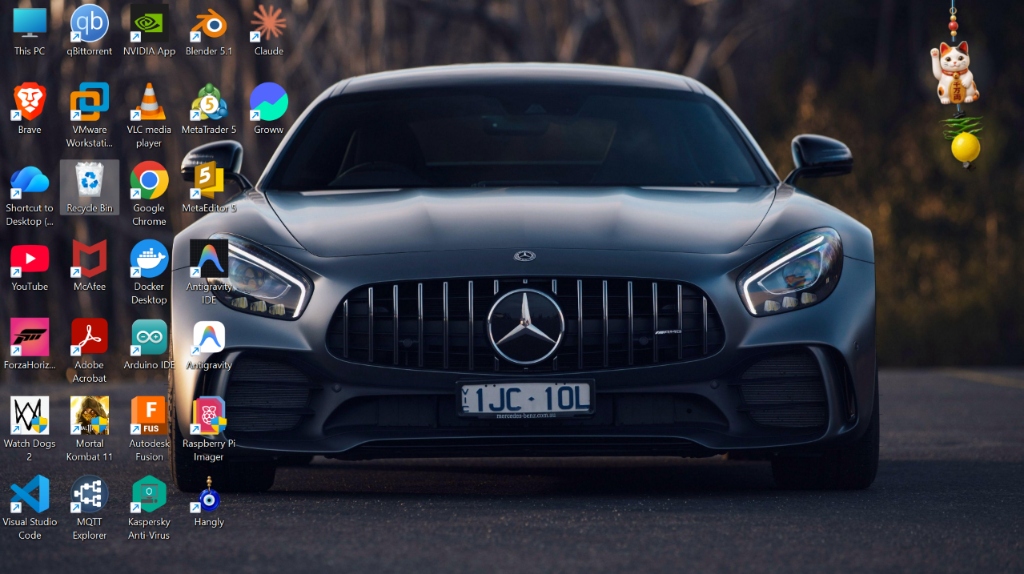
Hangly Desktop Showcase with Mercedes AMG Wallpaper

Real Desktop Integration

Japanese Daruma and Maneki-neko charms hanging naturally on a live Windows 11 desktop workspace.

Explore All Charms
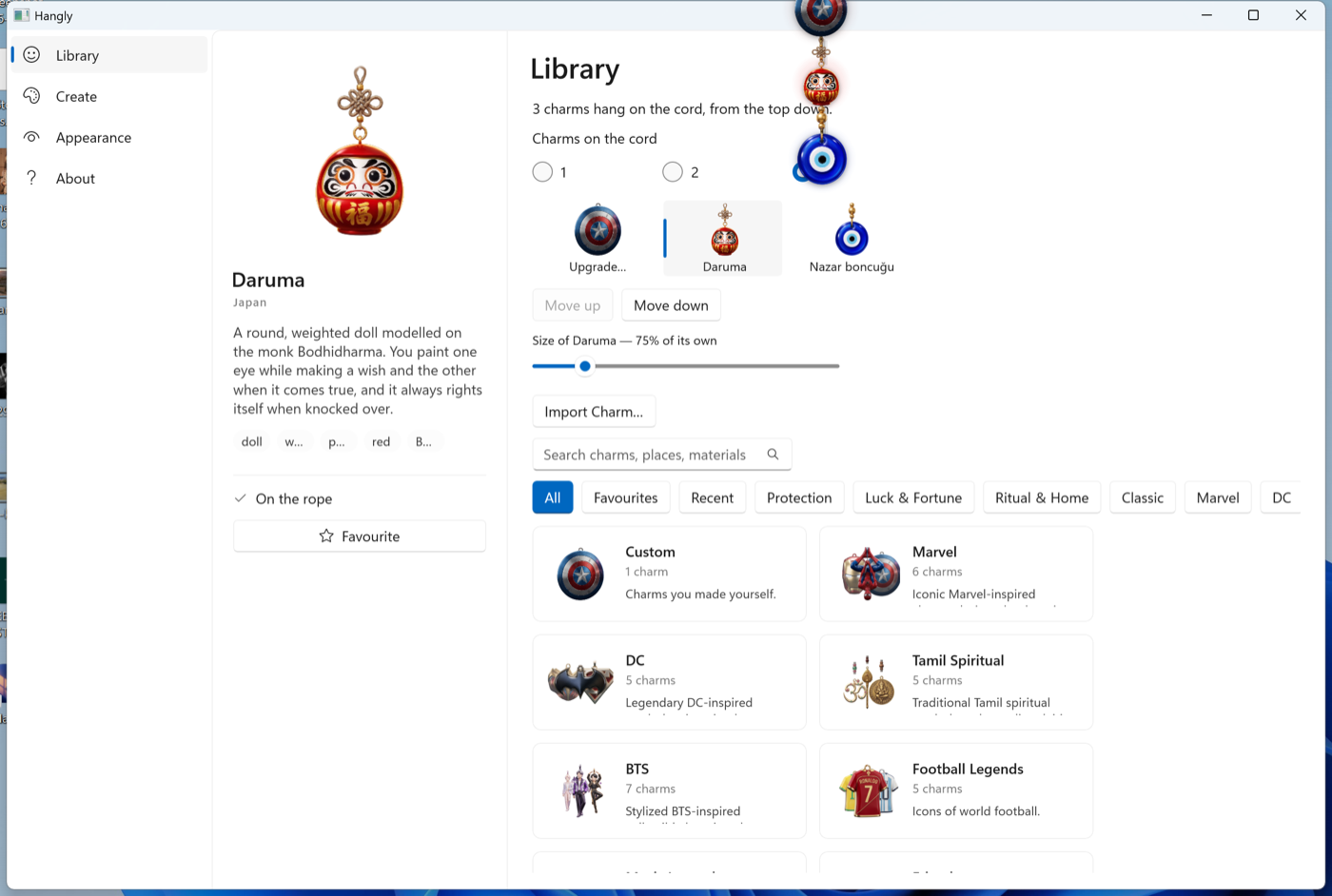
Hangly In-App Charm Library UI

Modern In-App Library

Browse, preview, and deploy charms with a single click.

Close up charm swinging above desktop icons

Sub-Pixel Precision

Ultra-crisp SVG vector rendering with soft alpha shadows.

Choose from 70+ Beautiful Charms

Each charm is crafted in sharp, lossless vector SVG format with customizable strings and anchor beads.

Up and Running in Under 60 Seconds

No complex dependencies, no terminal commands. Simple one-click setup designed for everyday users.

01

Scan Paytm UPI QR & Download

Click any Get Hangly button and scan the verified Paytm UPI QR code to complete your one-time license purchase. The Hangly-Setup.exe installer (130 MB) downloads instantly.

⚑ Instant Paytm QR Unlock πŸ“¦ 70+ Bundled Charms πŸ”‘ Lifetime License Included
02

Bypass Windows SmartScreen (First Launch)

Because Hangly is an independent indie release, Windows Defender SmartScreen might show a blue prompt saying "Windows protected your PC".

πŸ‘‰ Simply click "More info" and then click "Run anyway". Hangly is 100% clean, non-telemetry, and virus-free.

πŸ›‘οΈ Safe & Clean πŸ”’ Zero Malware πŸ” Verified Executable
03

Access Tray Icon & Pick Your Charm

Once launched, Hangly sits quietly in your Windows Taskbar System Tray (near your clock). Click the glowing 🎐 icon to open the library, pick your favorite charm, and click "Spawn Charm".

πŸ“Œ System Tray Resident πŸ–±οΈ Right-Click for Settings πŸ”„ Toggle Anytime
04

Drag, Anchor & Flick to Swing!

Grab the top bracket to position the anchor anywhere along your monitor's top bezel. Click and flick the hanging token with your mouse cursor to see the realistic Verlet pendulum physics in action!

🧲 Bezel Snapping πŸ“ Elastic Tension Stretch πŸ’« Natural Decay Motion
05

Add Your Own Custom Charms

Want to hang your own custom logo, pet photo, or meme? Simply open the in-app "Import Custom Charm" tab, drop any transparent PNG or SVG file, and it instantly hangs from your rope!

πŸ–ΌοΈ PNG, SVG & GIF πŸ“‚ Drag & Drop Storage ♾️ Unlimited Custom Charms

Choose Your Hangly License

Pay once, own forever. No monthly subscriptions, no intrusive ads, and free lifetime updates.

Complete Product
All features unlocked. Complete product lifetime access.
β‚Ή 51 INR • All Features Included
  • βœ“ Full Complete Product (All Features)
  • βœ“ Full 2D Verlet Rope Physics Engine
  • βœ“ All 70+ Premium Charms Unlocked
  • βœ“ Unlimited Multi-Charm Stacking (Hang 10+ at once)
  • βœ“ Multi-Monitor Simultaneous Display
  • βœ“ Custom PNG / SVG Charm Importer
  • βœ“ Windows 10 & 11 (64-bit) Full Support
  • βœ“ Free Lifetime Updates Forever

Got Questions? We've Got Answers

Does Hangly slow down games or video editing? +
Not at all! Hangly's physics calculations consume less than 0.5% CPU when moving, and immediately enters a zero-power sleep state once the charm comes to rest. It also automatically pauses when fullscreen games are running.
Why does Windows SmartScreen appear on installation? +
Windows SmartScreen automatically flags newly published software from indie developers until hundreds of users have installed it. Click "More info" → "Run anyway". Hangly is 100% clean and contains zero adware or telemetry.
Can I hang multiple charms across different monitors? +
Yes! With the Lifetime Pro edition, you can spawn as many charms as you like and freely drag them to separate monitors, different bezel edges, or active program windows.
Can I import my own custom artwork or memes? +
Yes! You can drop any transparent PNG, SVG, or animated GIF into the custom charm folder or import directly from the app interface.
What payment methods are supported? +
Payments are exclusively in Indian Rupees (INR • β‚Ή) via Paytm UPI, Google Pay, PhonePe, and BHIM. Choose either β‚Ή51 for the complete product or β‚Ή101 for more luck for you and the creator.
Is there a refund policy? +
Yes. We offer an unconditional 14-day money-back guarantee. If you are not completely satisfied with Hangly, simply reach out to support for an immediate full refund.